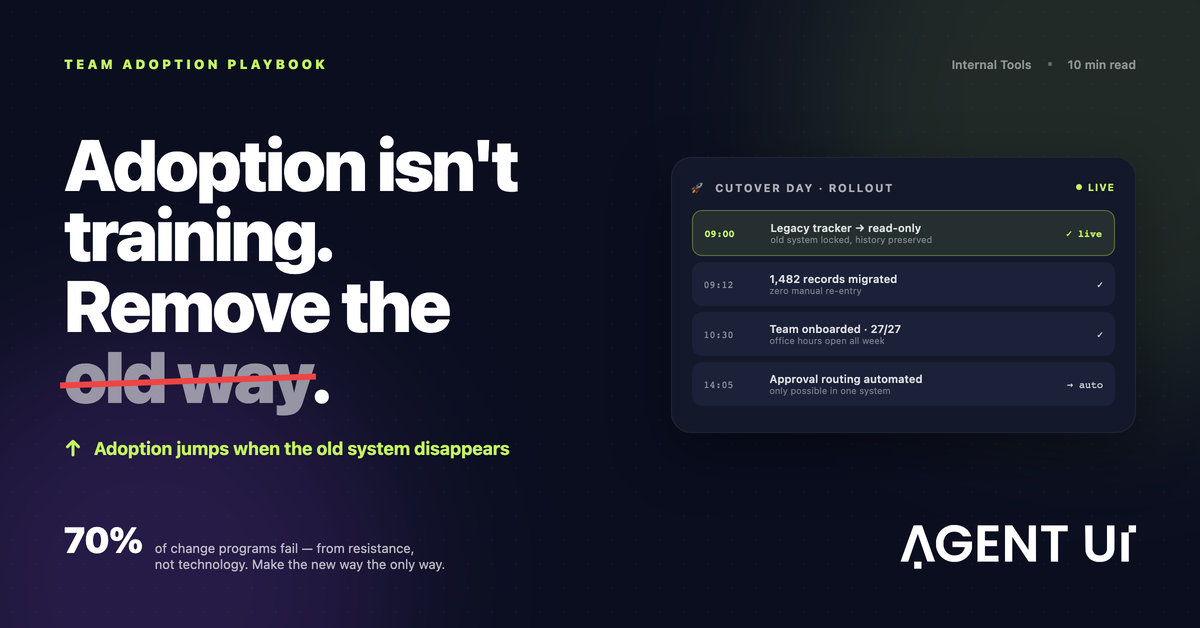
"Démosle un par de semanas más de transición." Si alguna vez dijiste esa frase durante la implementación de un software, ya sabes cómo termina: esas dos semanas se convierten en dos meses, y la herramienta nueva nunca despega del todo. Pasé cerca de diez años como gerente de TI construyendo software interno, y esa frase —dicha con las mejores intenciones— estuvo detrás de la mayoría de mis implementaciones fallidas.
La Respuesta Corta
¿Cómo logras que tu equipo adopte un nuevo software? Involúcralos desde el inicio, elige una herramienta intuitiva, capacita con flujos de trabajo reales y celebra las primeras victorias. Eso es lo que dice el manual, y no está mal. La adopción es un problema de gestión del cambio tanto como de herramientas.
Pero el manual nunca alcanzó por sí solo. Lo que de verdad funcionó fue más simple, y bastante más incómodo:
Eliminamos el sistema antiguo.
Cada vez que lanzábamos un software nuevo o cambiábamos un proceso, quitábamos de la mesa la forma vieja de hacerlo. Bloqueábamos la hoja de cálculo, dábamos de baja el formulario anterior. La gente se quejaba un par de semanas, y después adoptaba. Y una vez que todos los procesos corrían por la herramienta nueva, por fin pudimos automatizar una cantidad enorme de trabajo manual, porque la única forma de ejecutar el proceso era a través de un software que nosotros controlábamos.
Voy a repasar primero el manual estándar, porque lo sigues necesitando. Después entro en la técnica del corte, incluyendo cómo aplicarla sin que tu equipo termine odiándote.
Por Qué los Equipos Se Resisten al Software Nuevo
Casi nunca es el software.
La señal. En diez años implementando software interno, prácticamente nunca me crucé con un usuario que objetara una herramienta nueva por sus méritos técnicos. Con lo que me topé, una y otra vez, fue con miedo al cambio, así de simple.
La causa raíz. La hoja de cálculo vieja puede ser lenta y estar sostenida con copiar y pegar, pero es de ellos. Saben dónde está todo, la manejan rápido. Una herramienta nueva, aunque sea claramente mejor, los hace sentir lentos e incompetentes durante un par de semanas, y nadie se ofrece de voluntario para esa sensación. La estimación más citada de McKinsey dice que alrededor del 70% de los programas de cambio no alcanza sus objetivos, y el culpable de siempre es la resistencia de quienes tienen que vivir con ese cambio. Cada encuesta laboral que vi últimamente dice alguna versión de lo mismo: los empleados ya se sienten sepultados en herramientas, y asumen que cada una nueva significa más trabajo para ellos.
La solución no está en el software: está en tratar la implementación como lo que realmente es, un proyecto de gestión del cambio que de casualidad involucra tecnología. Todo lo que sigue se desprende de ahí.
El Manual de Siempre (Hazlo Primero)
El consejo estándar es estándar porque funciona. Si te lo saltas, ningún truco de corte te va a salvar.
1. Involucra al equipo desde el inicio
Las personas que van a vivir dentro de la herramienta todos los días tienen que ayudar a darle forma. Suma a dos o tres de tus futuros usuarios más intensivos al proceso de construcción, muéstrales prototipos, déjalos romper cosas. Quien ayudó a darle forma a una herramienta después la defiende, y termina siendo quien le enseña a todos los demás.
Aquí también está la ventaja de construir tu propio software interno en vez de comprar uno ya hecho. Cuando alguien pide un cambio y lo ve implementado esa misma semana, empieza a creer que la herramienta es suya. Un proveedor que le responde "está en el roadmap" logra exactamente lo contrario.
2. Elige una herramienta intuitiva
Cada clic de más te cuesta adopción. Si hace falta un manual para la tarea diaria más básica, la implementación ya está en problemas. Mi estándar siempre fue simple: un usuario nuevo completa el flujo de trabajo principal en su primer intento, sin ayuda. Si no puede, arregla la herramienta antes de arreglar la capacitación.
3. Capacita con flujos de trabajo reales, no con funciones
A nadie le importa un recorrido por la pantalla de configuración. Capacita a cada equipo en su trabajo concreto: "así registras un reclamo de un cliente", "así apruebas una orden de compra". Con datos reales, con casos límite reales. Una sesión de 30 minutos armada alrededor del martes típico de alguien vale más que dos horas repasando cada función del sistema.
4. Celebra las primeras victorias
Encuentra el primer momento en que la herramienta nueva le ganó claramente a la vieja: el reporte que tomaba cuatro horas y ahora toma diez minutos, ese tipo de cosa. Cuéntaselo a todo el mundo y nombra a las personas involucradas. Las primeras victorias les dan a los indecisos la prueba de que moverse es seguro, y le dan al liderazgo una razón para seguir respaldando el proyecto.
La Técnica Que Sí Funcionó: Eliminar el Sistema Antiguo
Diez años de implementaciones me enseñaron algo incómodo: puedes clavar los cuatro pasos anteriores y aun así ver morir la implementación. Por una sola razón.
La señal. Cada vez que lanzábamos una herramienta nueva junto a la vieja "durante un período de transición", pasaba lo mismo: el uso se disparaba la primera semana y después se escurría de vuelta a la hoja de cálculo de siempre.
La causa raíz. Mientras la forma antigua siga existiendo, la gente va a seguir usando la forma antigua. El período de transición nunca termina solo. La adopción opcional es, en el fondo, un "no" en cámara lenta.
La solución fue dejar de correr sistemas en paralelo. El día del corte, la hoja de cálculo pasaba a solo lectura y el formulario viejo se daba de baja. El software nuevo quedaba como la única manera de hacer el trabajo.
Y pasaba lo mismo cada vez que lo hacíamos: el debate sobre si cambiar o no simplemente se terminaba, y esa energía se iba directo a aprender la herramienta nueva. Las dos semanas incómodas de verdad se terminaban, porque todo el equipo las atravesaba junto en vez de postergarlas indefinidamente. Los problemas reales aparecían en cuestión de días, porque todos se topaban con ellos al mismo tiempo, y los arreglábamos mientras la atención seguía alta. Y todos los datos por fin vivían en un solo lugar.
Es el principio de quemar las naves aplicado al software de oficina. Cuentan que Cortés hundió sus barcos para que la retirada dejara de ser una opción. No hace falta nada tan dramático: poner una hoja de cálculo en solo lectura alcanza y sobra.
El dividendo de la automatización
Esta es la parte que la mayoría de los artículos sobre adopción se saltea, y para nosotros fue la recompensa más grande por lejos.
Cuando la única forma de correr un proceso era a través del software nuevo, cada paso de ese proceso se volvía visible para un sistema, y eso significaba que por fin podíamos automatizarlo. Las aprobaciones empezaron a enrutarse solas. Los reportes semanales dejaron de ser el viernes a la tarde de alguien. Nada de eso había sido posible antes, porque la mitad de cada proceso vivía desparramada entre bandejas de entrada y hojas de cálculo personales que ningún sistema podía ver.
La adopción nunca fue la meta final para nosotros. Era el requisito previo. La recompensa real aparece después, cuando todo el proceso vive dentro de un sistema que sí controlas.
Cómo Ejecutar un Corte Forzado sin Desgastar a Tu Equipo
Para que quede claro: eliminar el sistema antiguo no es excusa para saltarse el trabajo de gestión del cambio. Al contrario, sube las apuestas, así que la preparación tiene que ser mejor, no peor. Este es el manual al que llegamos después de equivocarnos varias veces.
- No quites nada hasta que la herramienta nueva esté genuinamente lista. Un corte forzado hacia algo a medio terminar quema una confianza que no se recupera fácil. El flujo de trabajo principal tiene que estar sólido y probado con usuarios reales antes de bloquear nada.
- Anuncia la fecha con semanas de anticipación, y repítela. "El día 15, el registro viejo pasa a solo lectura." Sin sorpresas. Lo que la gente teme es la sorpresa; una fecha es algo para lo que puede prepararse.
- Migra los datos tú mismo. Nunca le pidas a los usuarios que muevan sus propios registros. Si su historial ya está en el sistema nuevo el primer día, eliminaste la objeción racional más grande.
- Bloquea el sistema antiguo, no lo borres. La gente se relaja sabiendo que no se pierde nada, y de paso conservas un registro de auditoría.
- Refuerza el soporte durante la primera semana. Horarios de consulta, un canal de chat dedicado, alguien recorriendo la oficina en persona. La mayor parte de la resistencia se disuelve cuando la ayuda llega en menos de cinco minutos.
- Mantén la línea. Alguien va a pedir "solo una excepción". Esa primera excepción se convierte en el nuevo sistema antiguo. La respuesta tiene que ser un no amable y firme, más una solución real para la carencia concreta que motivó el pedido.
- Arregla lo que la gente reporta, rápido y a la vista. La primera semana de un corte trae una avalancha de feedback honesto. Entregar correcciones en cuestión de días es lo que termina de convencer a los escépticos.
Dónde Encaja AgentUI
Un corte forzado solo funciona si la herramienta nueva es genuinamente mejor, y si puedes mejorarla tan rápido como llega el feedback. Esa es la parte difícil, y es exactamente donde entra AgentUI.
AgentUI permite que los equipos de negocio construyan software interno a medida con IA: unos 30 minutos para tener una primera versión funcionando, y de ahí en adelante seguir refinándola según reaccionan los usuarios. Esa velocidad cambia toda la matemática de la adopción: cuando alguien reporta una falla el lunes y la ve corregida el miércoles, la herramienta se gana la confianza más rápido que cualquier capacitación. AgentUI además incluye acompañamiento personalizado desde el primer día: un equipo humano real que te ayuda a planear el lanzamiento y a migrar tus datos, para que no cargues solo con el esfuerzo del cambio.
Centralizar tus procesos en una sola plataforma es también lo que habilita el dividendo de la automatización. Cuando el trabajo fluye por un único sistema gobernado en vez de hojas de cálculo dispersas, las partes repetitivas por fin se pueden automatizar.
Preguntas Frecuentes
¿Forzar a los usuarios a cambiar no es malo para la moral?
Por lo que vi, la ambigüedad indefinida es peor para la moral que un corte limpio con una fecha clara. Lo que realmente daña la moral es que te empujen a una herramienta que no funciona, sin soporte y sin voz. Si la herramienta está lista, el soporte está presente y el feedback visiblemente lleva a correcciones, la mayoría de los equipos siente alivio: la decisión ya se tomó y todos avanzaron juntos.
¿Qué pasa si mi equipo genuinamente no puede hacer su trabajo en la herramienta nueva?
Entonces cortaste demasiado pronto. Restaura el acceso, corrige las carencias junto a tus usuarios piloto y fija una fecha nueva. La técnica es "eliminar el sistema antiguo una vez que el nuevo está listo", no "eliminar el sistema antiguo y esperar lo mejor".
¿Cuánto tiempo deberían correr en paralelo el sistema viejo y el nuevo?
Días, si puedes lograrlo. Usa una ventana paralela corta solo para validar los datos, ponle una fecha de fin anunciada públicamente y respétala. Un período paralelo que se vuelve cómodo tiende a volverse permanente.
¿Cómo mido si la adopción realmente funcionó?
Mira tres cosas: uso activo (¿todos los usuarios previstos entran a la herramienta cada semana?), finalización de procesos (¿el trabajo fluye de punta a punta por ahí?) y sistemas en la sombra (¿están reapareciendo en silencio hojas de cálculo nuevas?). Esa tercera es la señal de alerta temprana que la mayoría de los equipos se olvida de revisar.
¿Qué tan rápido puedo construir un software que valga la pena adoptar?
Con AgentUI, una primera versión funcionando toma típicamente unos 30 minutos, y una herramienta lista para producción, alrededor de una semana. Eso incluye los ciclos de iteración con tus usuarios piloto que hacen posible un corte con confianza.
¿Listo para construir un sistema que tu equipo sí use todos los días, y jubilar la hoja de cálculo para siempre?
Prueba AgentUI gratis: crea tu primer dashboard o app de gestión en minutos.