Why Teams Are Reconsidering Retool in 2026
Retool has been the default answer for "I need to build an internal tool fast" for years. It is genuinely powerful: a mature component library, direct database connections, and JavaScript customization for teams that know how to use it.
But 2026 looks different from 2020.
AI-native builders have changed what "fast" means. When you can describe an app in plain language and have a working system generated in 30 minutes — database, permissions, UI, and integrations included — the case for learning Retool's component-based model gets harder to make for anyone who is not already a developer.
The other thing that has changed: who actually builds internal tools. In 2020, that person was typically a developer. In 2026, it is just as likely to be an operations manager, a finance lead, or a department head who needs a tool running by Monday and cannot wait six weeks for an engineering sprint.
Retool was built for the 2020 version of that problem. The market has moved.
What Retool Actually Costs
The sticker price is $10/user/month for the Team plan. The real cost is higher.
To use Retool effectively beyond simple table views, you need someone who can write SQL queries directly in components, customize behavior with JavaScript, debug component failures after platform updates, and manage users, permissions, and infrastructure — especially for Retool Self-Hosted deployments.
For most companies, that means either a full-time engineering commitment or ongoing consulting. The annual Retool license for 15 users ($1,800) is easily dwarfed by the cost of the developer hours required to maintain what was built on it.
Retool is an excellent product — for developer productivity. If your team has an engineer whose job it is to build and maintain internal tools, Retool gives them powerful primitives. If your operations manager needs a tool by next week, Retool adds a dependency you may not have budgeted for.
What to Look for in a Retool Alternative
The right replacement depends on what you actually need. These dimensions matter most:
Technical requirement for builders. Can a non-developer build a functional app, or does it still require SQL and JavaScript?
AI assistance level. Does the platform generate app structure from a description, or just suggest components?
Human support model. If you hit something the AI or docs cannot solve, is there a real engineer available, or just a community forum?
Time to first working version. For a real use case — not a demo — how long from "I have a problem" to "the app is handling real data"?
Security and compliance. SOC 2 Type II, GDPR, audit logs, role-based access control. Do these exist at your price tier, or are they gated behind enterprise contracts?
Integration coverage. SQL databases, REST APIs, WhatsApp, email, custom webhooks — does the platform connect to your specific data sources?
Pricing model. Per-user pricing scales unpredictably. Does the platform charge per seat or per team?
The Best Retool Alternatives in 2026
AgentUI — Best for Teams That Need a Full System, Not Just Components
What it is: An AI-powered platform that generates full-stack internal applications from plain language descriptions. You describe what you need; the AI builds the complete system — database, UI, permissions, integrations. Real engineers are available when the complex 10% requires actual development expertise.
How it compares to Retool:
Retool gives you building blocks and expects you to assemble them. AgentUI generates the assembled system from your description. The output differs in kind: Retool produces a configured set of components; AgentUI produces a working application with a backend.
For teams with an engineering resource who wants precise component-level control, Retool remains competitive. For everyone else — operations teams, finance departments, logistics managers, healthcare administrators — AgentUI removes the assembly step entirely.
Key advantages over Retool:
- No SQL or JavaScript required. Describe your app in plain language; the AI handles the technical implementation. The closest Retool equivalent is its AI features, which assist with queries and component logic but still expect you to assemble the interface manually.
- Full-stack output. AgentUI generates backend, database, and UI together. Retool requires an existing database or API to connect to — it does not create your data layer for you.
- Human engineering support on every plan. A shared Slack channel with a real engineer is available from the first paid tier — not gated behind an enterprise contract. Igor Farbman, a customer in Australia, wrote that AgentUI "replied to my support email before I could make a coffee" after seven other AI builders failed him.
- Security included, not gated. SOC 2 Type II, GDPR, HIPAA with BAA available, AES-256 encryption at rest, TLS 1.3 in transit, audit logs at every paid tier. Retool gates audit logs and environment management behind Business and Enterprise plans.
- Native WhatsApp integration. For teams where WhatsApp is a primary communication channel — particularly in Latin America, the Middle East, and Southeast Asia — AgentUI pipes WhatsApp conversations directly into app workflows without custom API wiring.
Pricing: Free · Solo $25/mo · Builder $49.99/mo · Team from $99.99/mo (10 members) up to $499.99/mo (50 members) · Enterprise: contact us
Best for: Operations teams, finance departments, logistics managers, and companies in regulated industries that need production-grade internal tools without maintaining a dedicated developer for the tooling infrastructure.
Appsmith — Best Open-Source Alternative for Developer-Led Teams
What it is: An open-source, component-based low-code platform for building internal tools. Architecturally similar to Retool: drag-and-drop components, JavaScript customization, multi-source data connections.
How it compares to Retool:
Appsmith and Retool are closely related in philosophy. Both expect developers to build; both use JavaScript for custom logic; both connect to existing databases and APIs. The core difference is licensing: Appsmith is open-source under Apache 2.0, with self-hosted deployments free of charge and no per-seat fees.
For a developer team that wants Retool's capability model without Retool's per-user pricing, Appsmith is the most direct substitute — at the cost of managing your own infrastructure.
Key advantages over Retool:
- Self-hosted deployments are free with no user limits
- Open-source codebase — inspect, fork, and contribute
- Active community ecosystem with hundreds of templates
- Paid cloud option for teams preferring managed infrastructure
Key limitations compared to AgentUI:
- Requires JavaScript for anything beyond basic table and form configurations
- No AI-powered app generation — fully component-based
- No built-in human engineering support — community forums only
- Audit logs and compliance features require Enterprise tier
Pricing: Free (self-hosted) · from $40/month (cloud, per app)
Best for: Engineering teams that want Retool's build model without per-seat pricing and have the infrastructure capacity to self-host.
Budibase — Best for Self-Hosted Teams That Want More Than Just Components
What it is: An open-source low-code platform with a stronger focus on data management and automation workflows. Includes a built-in database, automation rules without custom JavaScript, and a gentler learning curve than Retool.
How it compares to Retool:
Budibase sits between pure no-code platforms and full developer tools. It has a built-in BudibaseDB that lets teams start without an existing data source — a meaningful advantage over Retool, which requires you to already have a database or API. Automation workflows are configurable without writing JavaScript.
Key advantages over Retool:
- Built-in database removes the prerequisite of an existing data source
- Automation builder for workflows without custom code
- Self-hostable with a generous free tier
- Role-based access control available at lower price points than Retool's Enterprise tier
Key limitations compared to AgentUI:
- Building still requires manual component configuration — no AI generation
- Complex workflows still require JavaScript
- No dedicated human engineering support
- Community support on free tier; professional support is paid
Pricing: Free (self-hosted) · from $50/month (Business tier, cloud)
Best for: Teams with some technical familiarity who want more control than pure no-code platforms and more approachability than Retool.
ToolJet — Best for Teams That Want Retool's Features at Lower Cost
What it is: An open-source internal tool builder that closely mirrors Retool's design — pre-built UI components, JavaScript customization, connections to 45+ data sources — but with a free self-hosted option and no per-seat licensing.
How it compares to Retool:
ToolJet is the most direct feature-for-feature alternative to Retool for engineering teams. The component library has grown significantly since its early versions, and the self-hosted deployment experience is well-documented. For developer-led teams already committed to Retool's build model, ToolJet delivers comparable functionality at infrastructure cost only.
Key advantages over Retool:
- Free self-hosted version with unlimited users
- Growing template library for common internal tool patterns
- Native connections to 45+ data sources including PostgreSQL, MySQL, MongoDB, REST APIs, and GraphQL
- Active development with frequent releases
Key limitations compared to AgentUI:
- Requires a developer to build and maintain apps — same skill requirement as Retool
- No AI-powered app generation
- Community support only on free tier; professional support on paid plans
- Compliance features gated behind Business tier
Pricing: Free (self-hosted) · from $20/user/month (Business, cloud)
Best for: Developer teams that want Retool's component model without per-seat costs and have capacity to self-host.
Appwrite — Best for Teams Building Fully Custom Apps
What it is: An open-source backend-as-a-service with databases, authentication, storage, and serverless functions. Less a Retool alternative and more a backend infrastructure layer for teams building custom internal tools from scratch.
How it compares to Retool:
Appwrite and Retool occupy opposite ends of the build spectrum. Retool is a pre-configured admin panel framework; Appwrite is infrastructure you build on top of. If your internal tool needs are unusual enough that no component library fits — unique data models, custom interaction patterns, deeply integrated business logic — Appwrite provides the backend without frontend constraints.
Key limitations compared to AgentUI:
- Requires frontend development skills — Appwrite handles the backend, you build the UI
- Significantly more engineering work than AgentUI for teams without dedicated developers
- No AI-assisted generation; no human engineering support
Pricing: Free (self-hosted) · from $15/month (Pro, cloud)
Best for: Development teams that want a managed backend for fully custom applications with complete control over the frontend.
Side-by-Side Comparison
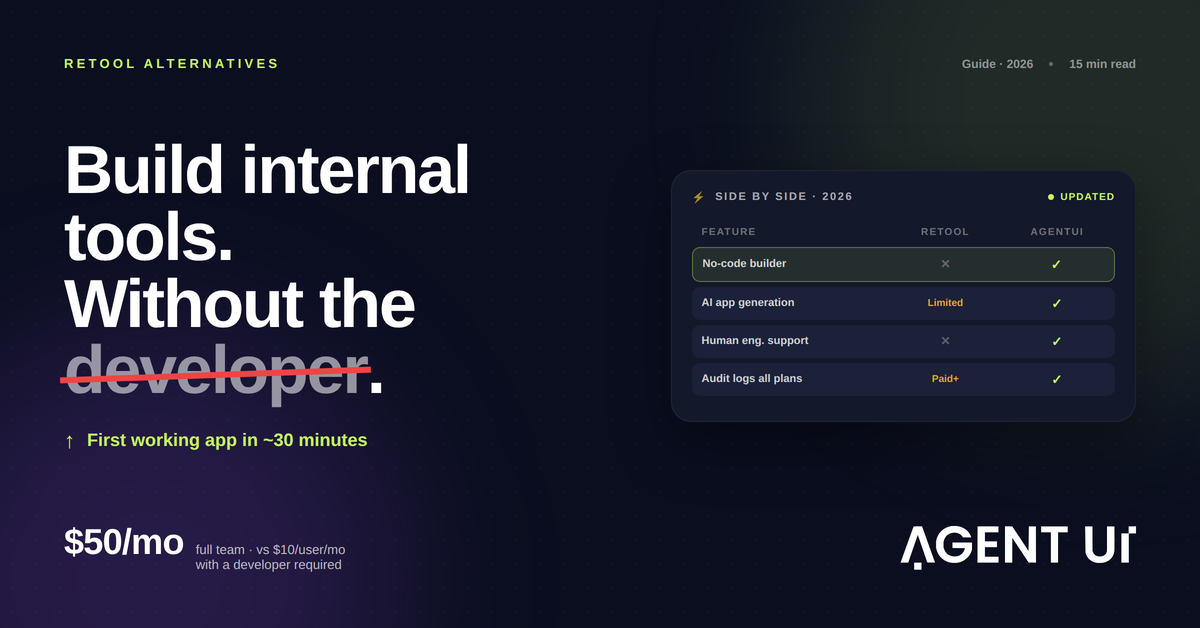
| AgentUI | Retool | Appsmith | Budibase | ToolJet | |
|---|---|---|---|---|---|
| Requires developer | No | Yes | Yes | Partial | Yes |
| AI app generation | Yes (full-stack) | Limited | No | No | No |
| Human engineering support | Yes — all paid plans | No | No | No | No |
| Generates backend + database | Yes | No | No | Partial | No |
| Self-hosted option | No | Yes | Yes | Yes | Yes |
| Native WhatsApp integration | Yes | No | No | No | No |
| SOC 2 Type II | Yes | Yes | Enterprise only | Enterprise only | Enterprise only |
| Audit logs | All paid plans | Business+ | Enterprise only | Enterprise only | Business+ |
| Starting price | $50/mo (team) | $10/user/mo | Free | Free | Free |
| White-glove onboarding | All paid plans | Enterprise only | No | No | No |
| Time to first working app | ~30 minutes | Days–weeks | Days–weeks | Days | Days–weeks |
Who Should Stay on Retool
Retool is not the wrong choice for every use case. Three situations favor it:
Teams with a dedicated internal tools engineer. If you have a developer whose primary role is building and maintaining internal tooling — not a product engineer who also maintains tools — Retool gives that person excellent primitives. The component library is mature, the JavaScript escape hatch is powerful, and the data source coverage is comprehensive.
Teams that need precise component-level control. Retool's manual assembly model gives developers control over interaction patterns that AI-generated apps might not replicate exactly. If your internal tool requires highly specific UX — custom animations, unconventional navigation patterns, pixel-specific layouts — Retool's granular control is an asset.
Teams with a significant existing Retool investment. Migrating away from a production Retool installation with complex JavaScript customizations and dozens of connected data sources is a non-trivial project. If you have substantial Retool apps running business-critical workflows, weigh the migration cost against the ongoing efficiency gap before switching.
The AI-First Shift That Changed the Equation
The fundamental shift from 2020 to 2026 is not another tool feature. It is what "building an internal tool" actually means.
In 2020: A business person identified a need, wrote a spec, opened a ticket, waited six weeks for an engineering sprint, and got a tool — maybe. Retool shortened that cycle for developers.
In 2024: That business person could use Retool — if they had SQL skills and basic JavaScript familiarity. Still a developer's skillset, but reachable for a technical operations person.
In 2026: That business person describes their need in plain language. A working system is generated in 30 minutes. Real engineers handle anything the AI could not resolve. First version is available today — not next sprint.
The constraint has shifted from "can the technology do this" to "can the right person build it fast enough to matter." Retool solved the first constraint. AI-native platforms like AgentUI address the second.
That is why the Retool alternatives conversation in 2026 sounds different from 2022. It is not about finding a cheaper component library. It is about whether you want to configure an app or describe one.
The Human Support Gap
Every open-source Retool alternative shares one limitation: when you hit a problem the documentation cannot solve, you are on your own.
Appsmith, Budibase, and ToolJet all have community forums and documentation. None of them have an engineer who will get in a Slack channel with your team and solve the problem by end of day.
For teams building production-grade tools — tools that run real business processes, handle real customer data, and need to work reliably Monday morning — that support gap is material. The cost of a broken production internal tool is not the cost of an hour of Slack support. It is the cost of your operations being down until someone fixes it.
AgentUI's model explicitly addresses this. The shared Slack channel with a real engineer is not a premium feature — it is part of every paid plan. The AI builds 90% of what you need; the engineers handle the 10% that requires actual expertise. For teams in regulated industries, for teams running mission-critical operations workflows, and for teams without internal developer resources, that support model is the difference between a tool that works reliably and a tool that works most of the time.
Frequently Asked Questions
Can I migrate existing Retool apps to AgentUI?
Yes, though migration is not a one-click process. Your existing app logic, data connections, and UI patterns can be rebuilt in AgentUI — often with less total configuration, since AgentUI generates the structure from a description rather than requiring manual component placement. The AgentUI team provides migration support as part of onboarding for all paid plans.
Does AgentUI work for teams without any technical staff?
Yes. The platform is designed for business builders — operations leads, finance managers, department heads — not developers. You describe what you need in plain language; the AI builds it. The engineering team handles anything complex that requires developer expertise. You do not need to understand the technical implementation to use or modify your apps.
What if I need an integration Retool supports but AgentUI doesn't list?
AgentUI supports direct SQL connections (read and write), REST API integrations, email, WhatsApp, and custom webhooks. If you need a specific integration not in the standard library, the engineering team handles custom integrations — particularly on the Team and Enterprise plans. For unusual data sources, a brief call with the team is the fastest path to a solution.
How does AgentUI handle production reliability?
Production environments include a 99.9% uptime SLA, separate deployment from development and staging environments, a production lock to prevent accidental changes, and instant rollback. The system is hosted on enterprise-grade infrastructure with per-tenant isolation — your data and compute are never shared with other customers.
Is AgentUI available in Spanish and other languages?
Yes. The platform interface is available in multiple languages, and the team includes Spanish-speaking engineers — relevant for the platform's strong traction in Latin America. Customer support, onboarding, and the shared Slack channel operate in both English and Spanish.
Start With Your Real Use Case
The right way to evaluate any Retool alternative is not to compare feature lists. It is to pick your actual internal tool need — a dashboard, an approval workflow, a data entry form connected to your database — and measure how long it takes to build a working version.
The tools that look equivalent in a feature grid often diverge significantly on that single metric: time from "I have a business problem" to "an app is handling real data."
AgentUI is free to try, no credit card required. Describe your most pressing internal tool — what it needs to do, who uses it, what data it connects to — and have a first working version in about 30 minutes.